
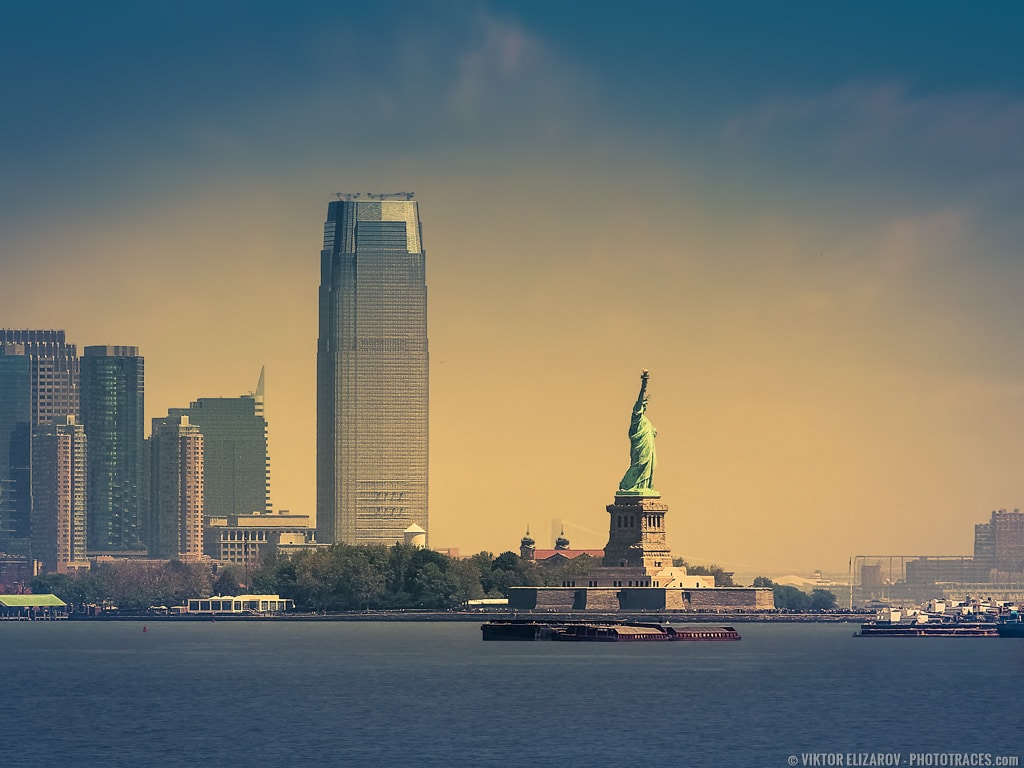
I took this photo from the Staten Island Ferry during my morning ride to Manhattan. It was hazy summer morning and I had little hope of getting any interesting shots. I was waiting for the sunset ride back to Staten Island in the evening (check photo from that evening).
The reason for me taking a gazillion of shots that morning was my recent purchase of a brand new Canon 70-200 lens and I wanted to test it in different scenarios. Now I am working on Lightroom Editing System for Cityscapes and Architectural photography and I thought this photo would be a perfect example on how to revive boring photos with creative editing.
Loc: 40.685381, -74.040837
Shooting & Processing
I was on moving ferry, it was shaky, windy and I was shooting with telelens at 200mm on a crop sensor, hand-held. The main challenge was to get sharp photos. I set the camera to continuous shooting and selected a pretty fast shutter speed at 1/640. I was shooting in bursts of 8-10 shots. When I analyzed all the photos later in Lightroom, more than half of them were perfectly sharp.
To fix low contrast, colorless and haziness in the photos I had to use pretty aggressive editing. I used Lightroom Rapid Editing, applying Gentle Wave STYLE preset first from Cross Processed Collection and then used TOOLKIT adjustments.
Lightroom Editing Formula: Gentle Wave (4, 8, 12, 17, 31)
Deconstructing Featured Photo
- Camera: Canon 60D
- Lens: Canon 70-200 4L
- Focal Length: 200mm
- ISO: 100
- Aperture: F8
- Shutter: 1/640
- Bracketing: 3 (-1, 0, +1)
- Tripod: hand-held
Processing:
Lightroom: import, tagging, straightening, Lightroom Rapid Editing, Lightroom Editing Formula: Gentle Wave (4, 8, 12, 17, 31)
Photoshop: straightening, color correction, contrast, cleaning with the Stamp Tool ( I removed structure in the foreground).
Photoshop Plugins:
- Topaz DeNoise was used to reduce digital noise (sky, water).
- Topaz Clarity was used to enhance details and boost colors (architectural elements).
Before & After Transformation


